
- Apps


 Easy Bundle ‑ Product Builder
All-In-One bundle builders
 Qe Slider ‑ Carousel Slider
Elevates Revenue with Slick Slider
 Qe Seasonal Effects & Decor
Add Festive Seasonal Decorations
 Qe Quick Link Redirect
Fix Broken Links Effortlessly
 Qe Frequently Bought Together
Boost Sales with Smart Upsells
 QeApps ‑ Mobile App Builder
No-code Mobile App Builder
 Qe Product Compare
Allowing Shoppers to Compare Items
 Qe Multiship
Ship Items to Multiple Addresses
 Discount Bulk Volume Quantity
Create Custom Product Bundles
 Sticky Cart+ Fly Cart
Add Fly-to-Cart Animations.
 QeCart ‑ Slide Out Cart
Add Dynamic Slide-out cart
 Qe Speechify | Voice Search
Seamless Voice Search Functionality
 Qe FAQ Page & Product FAQs
Customizable Product FAQs
 ATC Button Animation
Add to Cart Button Animations

Explore Our Shopify Apps to Grow Your Store
- Check Our Apps

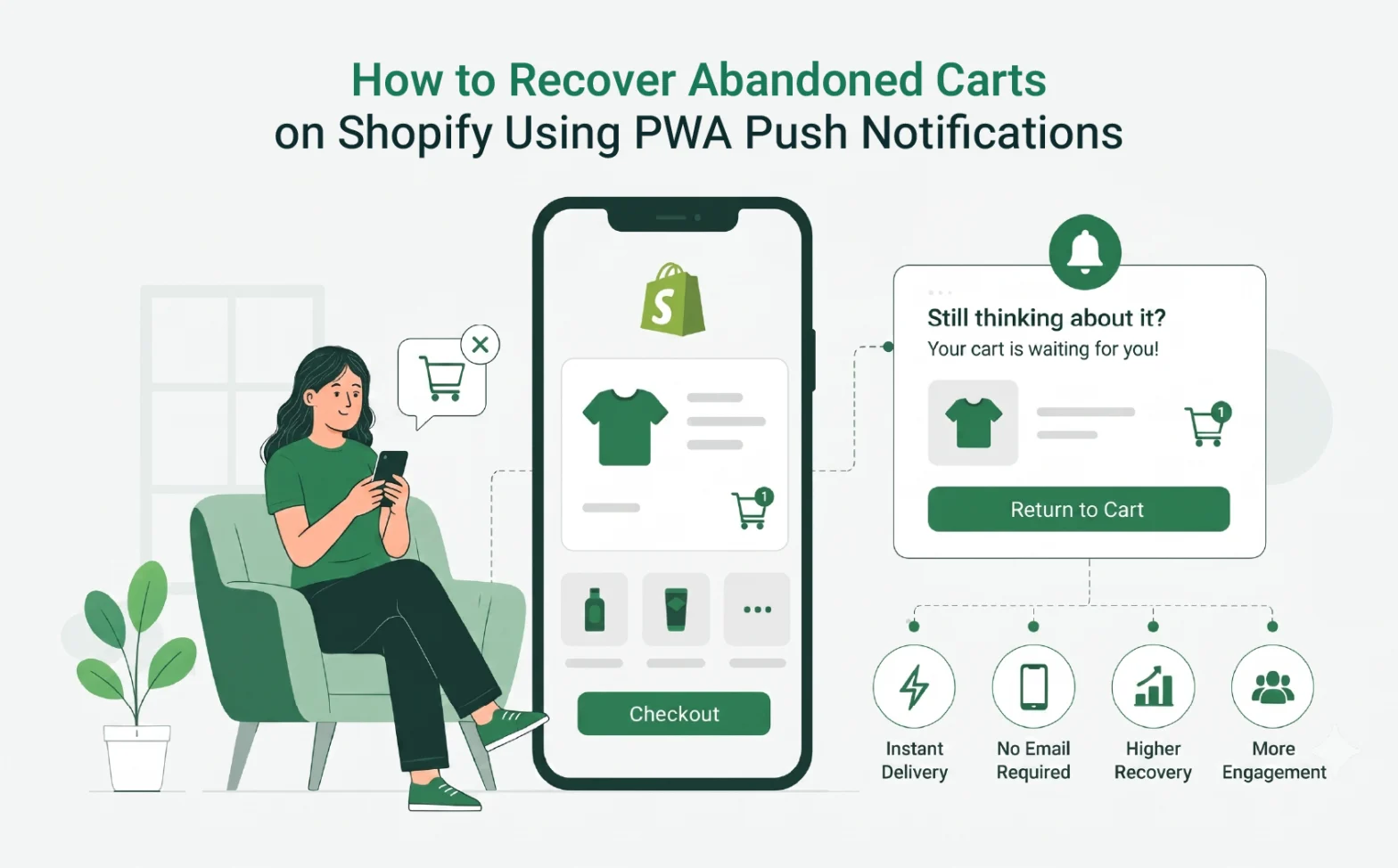
If you run a Shopify store, you are losing sales every day to cart abandonment. Shopify abandoned cart push notifications are one of the most direct ways to stop that leak and bring shoppers back before the moment passes.
Most recovery tools chase the same audience — people who already gave you their email. Push notifications reach everyone else: the mobile-first shopper who browsed without signing up, the repeat visitor who got distracted mid-checkout, the customer who compared prices and nearly came back on their own.
This guide covers how Progressive Web App (PWA) push notifications work, why they recover more carts than email alone, and how to set them up on Shopify without touching a line of code.
The Size of the Problem You Are Dealing With
Seven out of every ten shoppers who add something to a cart on your store will leave without buying.
According to the Baymard Institute’s analysis of 49 independent studies, the average global cart abandonment rate sits at 70.19%. On mobile, that figure climbs closer to 80%.
That means if 1,000 people add something to their cart today, roughly 700 of them leave without completing the purchase. Some are browsing with no immediate intent. Others were interrupted mid-session. A few simply needed one small prompt that never came.
That last group is the one worth targeting. They had real purchase intent, chose a product, and reached the cart. Something got in the way, and without a recovery channel, that sale is simply gone.
Why Email Alone Is Not Enough
Abandoned cart emails are worth sending. They still convert, particularly for customers already on your list.
Yet the structural problem is what email cannot reach.
Most first-time visitors to your Shopify store never hand over their email address. They browse, add items to the cart, and leave — with no contact detail attached. No email means no recovery message. That traffic, which you paid to acquire through ads or SEO, disappears without a trace.
Even when you do have an address, the window matters. By the time your cart abandonment sequence lands in the inbox and the shopper opens it, hours may have passed. Other offers fill the gap. The purchase window closes.
Email also competes in an increasingly crowded channel. In fact, the average inbox receives dozens of marketing messages per day. A cart recovery email from a store the shopper visited once is easily buried.
Push notifications, however, work differently. They do not need an email address, they do not sit in an inbox, and they arrive on the device in the shopper’s hand within seconds of the trigger.
Quick Insight
Most shoppers who abandon their cart never fill in an email form; they just leave. Push notifications capture them at the browser level on their very first visit, so your recovery list grows before anyone has even placed an order.
What Are PWA Push Notifications?
PWA push notifications are real-time browser alerts sent directly to a shopper’s phone or desktop, even when they are no longer on your website.
A Progressive Web App (PWA) is a version of your Shopify store that behaves like a native mobile app. Shoppers can add it to their home screen, browse it offline, and receive push notifications, all without downloading anything from the App Store or Google Play.
When a visitor gives your store browser permission to send notifications, a single one-time click, you can reach them across any device they used to visit. From that point on, you can send cart recovery alerts, restock updates, flash sale messages, and more.
No email address required. No app download needed. One opt-in is enough to open the channel.
How Web Push Notifications Actually Work
The process is simpler than it sounds.
A visitor lands on your PWA-enabled Shopify store. Their browser shows a short permission prompt: “Allow [Your Store] to send you notifications?” One click and they are subscribed.
Behind the scenes, their browser registers with a push service managed by Chrome, Safari, or Firefox. Your store uses a background script called a service worker to send notifications through that service, even when the browser tab is closed.
The notification appears on their device exactly like a standard alert: a product image, a short headline, a line of body text, and a tap-through link back to their cart.
The whole process is immediate. Unlike email, it does not require the shopper to be actively browsing. Notifications show up right when shoppers are most likely to act.
Quick Insight
Push notifications reach shoppers even after they close your store tab. A background script keeps the connection alive – so your cart reminder can land while they are scrolling social media, not just when they are on your site.
Five Reasons PWA Push Outperforms Other Recovery Channels
Five Reasons PWA Push Outperforms Other Recovery Channels
1. It works without an email address.
PWA subscribers are captured at the browser level. Your reachable audience grows with every new visitor who opts in, regardless of whether they ever provided contact information.
2. Notifications arrive in seconds.
Abandoned cart emails typically follow a delay. Instead, push notifications fire within seconds of the cart trigger. Intent is highest in the first 30 to 60 minutes after a shopper leaves. Speed directly affects recovery rates.
3. Visibility is instant.
A push notification appears on the lock screen. It does not queue in a folder. According to Omnisend’s analysis of 266 million web push messages, automated push notifications achieved a 65.1% open rate, more than double the typical open rate for promotional emails.
4. No app download friction.
With a PWA, shoppers never visit an app store. The experience lives in the browser. That removes the biggest barrier between your store and a mobile subscriber.
5. iOS and Android are both covered.
Modern PWAs send push notifications across both platforms through a single Shopify integration. You do not need separate configurations for iPhone and Android users.
Getting the Timing Right
Most merchants under-think this. Timing a cart recovery sequence well makes as much difference as the message itself.
A short automated sequence consistently performs better than a single message:
- First notification — 30 to 60 minutes after abandonment. Catch the shopper while the product is still fresh. Keep the copy simple: remind them what they left, and link directly to their cart.
- Second notification — 24 hours later. If the first did not convert, add a mild incentive. Free shipping or a modest discount often resolves the hesitation that caused the original drop-off.
- Third notification — 48 to 72 hours out. Use this sparingly. A low-stock or time-limited message works here, but only if it is accurate. Manufactured urgency catches on quickly and damages trust faster than any missed sale.
Test the intervals. A B2B accessories store and a fashion brand recover carts on very different timelines. Let your own data guide the cadence.
Quick Insight
Most recoveries come from the first notification, not the follow-ups. If your results are low, check the first message, is the product image showing? Is the copy specific? Fix those two things before changing anything else.
Personalisation That Moves People
“You left something behind” is the single most forgettable cart recovery message you can send.
In particular, the notification needs to show the specific product the shopper was considering. Product images in rich push notifications create an immediate visual connection. Shoppers who see the exact item they were looking at are far more likely to tap through than those who receive a generic prompt.
A well-structured abandoned cart notification includes:
- The product name and image
- The price, especially if you are offering a recovery discount
- A single, direct call to action: “Your cart is ready” or “Complete your order”
Also, keep the headline under 50 characters. The body text should carry one message only. Two competing ideas in a single notification reduce click-through rate.
Quick Insight
Always include the product image in your cart recovery notification. Shoppers instantly recognise what they left behind, and that recognition is what turns a tap into a completed purchase.
Mistakes That Undercut Your Recovery Strategy
Even a well-set-up push notification programme can underperform if the execution slips in these areas:
Triggering the opt-in prompt too early. If the browser permission request fires the moment a visitor lands on your homepage, most will decline. They have no relationship with your store yet. Delay the prompt until the shopper has browsed at least one product or reached the cart page.
Sending too frequently. One to three relevant notifications per week is a reasonable ceiling for most stores. Beyond that, opt-out rates rise sharply and your subscriber list shrinks.
Generic copy at scale. Sending identical messages to every abandoned cart subscriber treats a first-time visitor the same as a repeat customer. Segment where you can. New visitors respond differently to incentives than returning buyers.
Linking to the homepage, not the cart. Every additional click between the notification and the checkout is a point of drop-off. Instead, deep-link directly to the cart or product page every time.
How QeApps PWA Makes This Practical for Shopify Merchants
Setting up a PWA push notification system from scratch is a development project. For most Shopify merchants, that means time, cost, and ongoing maintenance they did not plan for.
Qe PWA for iOS and Android handles the infrastructure so you do not have to.
The app carries the Built for Shopify badge, which means it meets Shopify’s standards for performance, quality, and user experience. It installs directly from the Shopify App Store in a few clicks, with no theme edits or developer involvement required.
Once active, your store becomes an installable PWA for both iOS and Android. The push notification system is built in and managed from inside your Shopify admin. Custom branding, splash screen icons, and offline browsing come included.
The QeApps support team is available for setup assistance, which means you are not left working through documentation alone. Most stores are live within a matter of minutes.
For merchants who have sorted the fundamentals and are looking for the next lever in mobile customer retention, this is a concrete starting point.
Conclusion
Abandoned carts are not a traffic problem. More visitors will not solve them.
The real gap is what happens after someone adds a product to their cart. PWA push notifications close that gap by reaching shoppers in real time, on the device they are already holding, without needing an email address to do it.
Most of the shoppers who leave your Shopify store mid-session are reachable. They just need the right prompt at the right moment.
Qe PWA holds Shopify’s Built for Shopify badge, which means it has been independently reviewed and meets Shopify’s highest standards for performance, reliability, and merchant experience. Setup takes minutes, requires no code, and the push notification system is ready to use from your Shopify admin from day one.
Explore Qe PWA for iOS and Android. The app carries the Built for Shopify badge on the QeApps website, or install it directly from the Shopify App Store and have your first cart recovery notification live before the end of the day.
Frequently Asked Questions
Q.1 Do I need a native app to send push notifications to Shopify customers?
No. A Progressive Web App (PWA) lets you send push notifications through the browser. Shoppers do not need to download anything from the App Store or Google Play.
Q.2 How soon after cart abandonment should I send the first push notification?
The first notification works best within 30 to 60 minutes of abandonment. Shopper intent is highest in that window. A timely reminder often converts without needing a discount attached.
Q.3 Can I send push notifications to both iPhone and Android users with a Shopify PWA?
Yes. Qe PWA supports push notifications on iOS and Android from a single Shopify integration. No separate setups are needed for each platform.
Q.4 Will shoppers opt out if I send too many notifications?
That depends on sending frequency and message relevance. Sending one to three targeted notifications per week tends to keep opt-out rates low. Frequency without relevance is the main driver of unsubscribes.
Q.5 Do PWA push notifications require coding to set up on Shopify?
Not with the right app. Qe PWA installs from the Shopify App Store in a few clicks with no theme edits required. The push notification system is included and ready to use from within your Shopify admin.
Related Blogs



 [email protected]
 +91 95747 42204
 9th Floor, Solitaire Connect, Near Gallops Motors, SG Highway, Ahmedabad, Gujarat 380015


