
- Apps
 BYOB ‑ Bundle Gift Box Builder
Build your Own Box
 Easy Bundle ‑ Product Builder
All-In-One bundle builders
 Checkout Blocks & Customizer
Checkout Customization
 Qe Slider ‑ Carousel Slider
Elevates Revenue with Slick Slider


 Qe Seasonal Effects & Decor
Add Festive Seasonal Decorations
 Qe Quick Link Redirect
Fix Broken Links Effortlessly
 Qe Frequently Bought Together
Boost Sales with Smart Upsells
 QeApps ‑ Mobile App Builder
No-code Mobile App Builder
 Qe Product Compare
Allowing Shoppers to Compare Items
 Qe Multiship
Ship Items to Multiple Addresses
 Discount Bulk Volume Quantity
Create Custom Product Bundles
 Sticky Cart+ Fly Cart
Add Fly-to-Cart Animations.
 QeCart ‑ Slide Out Cart
Add Dynamic Slide-out cart
 Qe Speechify | Voice Search
Seamless Voice Search Functionality
 Qe FAQ Page & Product FAQs
Customizable Product FAQs
 ATC Button Animation
Add to Cart Button Animations

Explore Our Shopify Apps to Grow Your Store
- Check Our Apps


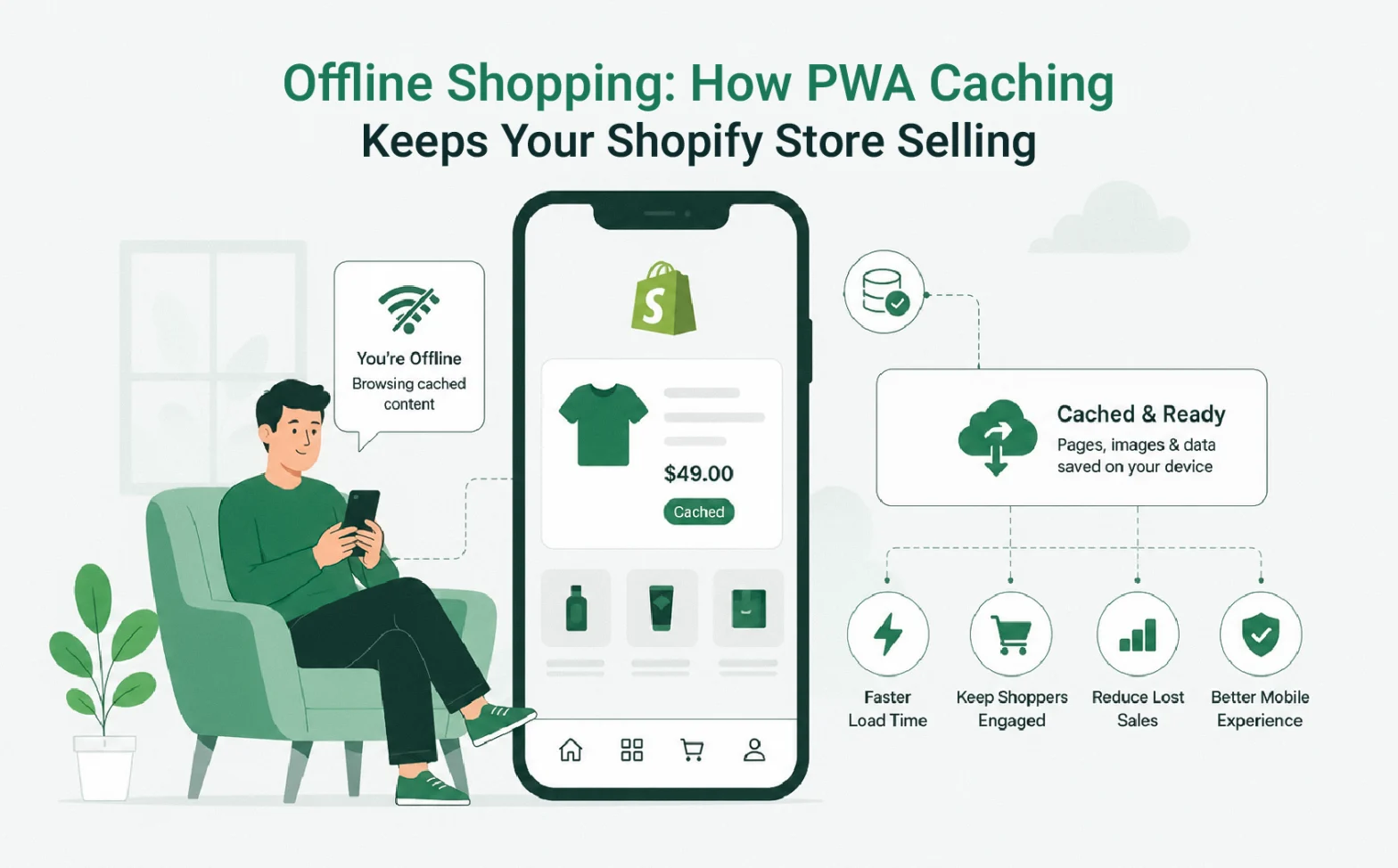
PWA caching lets a Shopify store save key pages, images, and data on a shopper’s device using a service worker. When the connection drops, the shopper can still browse recently viewed products instead of hitting a blank screen. This keeps the shopping experience going, protects your brand’s credibility, and cuts the chance of losing a sale to a dead zone or patchy mobile signal. Qe PWA, which carries the Built for Shopify badge, adds this offline mode to Shopify stores without any coding.
The Problem: A Dropped Connection Shouldn’t Mean a Lost Sale
Take a DTC skincare brand with strong mobile traffic. A shopper browses three product pages on their commute home. The train enters a tunnel. On a standard mobile site, the page freezes or throws a browser error. The shopper closes the tab and, in many cases, never comes back.
On a Shopify store with PWA caching enabled, the same shopper keeps scrolling through the three pages they already opened. Nothing breaks. Nothing looks broken. When the train exits the tunnel, the page reconnects and checkout becomes available again. The shopper never had a reason to leave.
Why This Matters More Than Merchants Think
That single saved session, multiplied across thousands of mobile visits a month, is the real business case for offline browsing. Mobile shopping happens on commutes, in lifts, in basements, and in rural areas with patchy 4G. Every one of those moments is a chance to keep a shopper engaged or to lose them for good.
Most store owners treat a lost connection as a customer problem, not a store problem. In reality, it is both.
A page load time that stretches from one second to five seconds already increases the probability of a mobile visitor bouncing by 90%, according to Google and SOASTA’s joint research on mobile bounce rates. <cite index=”24-1″> As page load time goes from one second to five seconds, the probability of bounce increases by 90%</cite> A dropped connection produces the same effect, only worse. The page does not load slowly; it fails to load at all.
Offline shopping is not about replacing the internet. It is about giving shoppers something to look at while the connection catches up.
Quick Insight
Test your own store’s offline behaviour by switching on Airplane Mode after loading two or three product pages. If they still render, your caching setup is already working.
What Is PWA Caching, and How Does It Work?
A Progressive Web App, or PWA, is a website that behaves like an installed app. Shoppers can add it to their home screen, open it with an icon, and browse it without a browser bar in the way.
PWA caching is the mechanism that makes this possible offline. It works through a small background script called a service worker. This script saves copies of pages, images, and other assets on the shopper’s device.
Here is the process in simple steps:
1. A shopper visits your Shopify store for the first time.
2. The service worker registers in the background and starts saving key assets: the homepage, recently viewed products, images, and styling files.
3. On the shopper’s next visit, or if their connection drops, the service worker checks its saved cache before trying the network.
4. If a matching page exists in the cache, it loads instantly, even offline. The shopper can still view products they already opened and move between them. Actions needing live data, such as checkout or search, stay unavailable until the connection returns.
5. Once the connection returns, the service worker quietly updates the cache with fresh content.
None of this requires the shopper to do anything. It runs silently in the background, the same way a native app keeps some content ready before you open it.
This is different from simply having a fast website. Speed depends on the network, but caching does not.
Quick Insight
A service worker only starts caching after its first successful registration on a shopper’s device. Their very first visit will not be offline-ready, but every visit after that is.

Browser Cache vs PWA Cache: Why the Distinction Matters
Merchants often confuse the browser’s automatic cache with a service worker’s PWA cache. They are not the same thing, and the difference decides whether your store works offline or not.
| Feature | Browser (HTTP) Cache | PWA (Service Worker) Cache |
| Works when offline | Unreliable, often fails | Designed to work offline |
| Who controls it | The browser decides | The store’s service worker decides |
| Storage lifespan | Can be cleared anytime by the browser | Persists reliably until the app updates it |
| Customisation | Little to no control | Full control over what is saved and for how long |
| Best suited for | General page speed | Offline browsing and app-like reliability |
Google’s own developer documentation on caching strategies confirms this distinction. <cite index=”14-4″>The service worker cache can still return cached resources when the network is unstable, while the HTTP cache is not reliable when the network is unstable or down.</cite> That single point explains why a fast website is not automatically an offline-ready one.
Quick Insight
You can inspect exactly what a service worker has cached in Chrome DevTools, under Application > Cache Storage. It lists every saved page and asset, which makes it easy to check your setup instead of guessing.
What Merchants and Customers Both Gain
The value of PWA caching splits naturally into two sides of the same experience.
For merchants, it means:
- Fewer dropped sessions, since shoppers stay on cached pages instead of bouncing to a competitor
- Stronger mobile brand perception, because the store feels reliable rather than fragile
- Better repeat engagement, as shoppers who install the PWA to their home screen open it more like an app than a bookmark
- A lower-cost alternative to native app development, with no app store approval and no separate codebase
For customers, it means:
- Recently viewed products stay available without reloading
- The store looks and feels consistent, whether online or offline
- Faster repeat visits, since cached assets do not need to download again
- A smoother, app-like experience without installing anything from an app store
Common Myths About Offline Shopping
Myth: Offline mode means customers can buy without internet. Not true. Checkout, payment, and live inventory checks still need a connection. Offline caching keeps browsing alive, not transactions.
Myth: Any fast website already works offline. Speed and offline reliability are separate things, as the table above shows. A fast site with no service worker still fails completely when the connection drops.
Myth: PWA caching is only useful for large stores. Small and mid-sized Shopify stores often have the most mobile-heavy, on-the-go traffic, which makes offline resilience just as valuable for them.
When to Use It, and How to Do It Well
Offline caching earns its place on any Shopify store where mobile devices bring in a meaningful share of traffic. It also matters when customers browse in transit, in areas with patchy signal, or when repeat browsing matters more than one-off visits. The same applies if the brand wants an app-like presence without building a native app.
It is less critical for stores that only sell through desktop-heavy channels. Even so, mobile traffic keeps growing across almost every Shopify vertical.
Where it is used, a few practices keep it working well:
- Cache the homepage, key collection pages, and recently viewed products first
- Keep cached assets lightweight so storage does not grow unnecessarily large
- Refresh the cache automatically once the connection returns, so shoppers never see stale prices or stock levels
- Pair offline browsing with an add-to-home-screen prompt, so shoppers return to the store like they would an app
- Test the experience with the connection deliberately switched off, not just assumed to work
Quick Insight
Keep the cached asset list under a few megabytes. Larger caches take longer to refresh and can hit storage limits on older phones, which slows down the exact experience you are trying to speed up.
How Qe PWA Delivers This for Shopify Stores
Qe PWA turns a Shopify store into an installable, app-like experience for iOS and Android, with offline browsing built in and no code required. The app carries the Built for Shopify badge, works across all Online Store 2.0 themes, and sets up in minutes.
Alongside offline mode, it includes home screen installation, push notifications for re-engagement, and custom branding for the install prompt. The offline caching layer runs automatically once the service worker activates. For merchants exploring the Qe PWA for iOS & Android app on the Shopify App Store, shoppers get the experience described above without any extra setup.

Final Thoughts
Mobile shoppers do not browse in perfect conditions. Signals drop, tunnels happen, and rural connections stay patchy. PWA caching for Shopify stores exists precisely for those moments, keeping the shopping experience alive instead of letting it collapse into a blank screen.
It will not replace a live connection for checkout. It does protect the browsing experience that leads up to it, which is where most mobile sessions actually happen.
Merchants who want this layer of resilience without touching code can explore how Qe PWA adds offline browsing, home screen installation, and push notifications to a Shopify store in one setup.
FAQs
Q.1 What is PWA caching?
PWA caching is the process of a service worker saving pages, images, and other assets on a shopper’s device. This allows a Progressive Web App to keep working, at least for browsing, even when the internet connection drops or becomes unstable.
Q.2 Does a Shopify PWA work without internet?
Yes, for browsing. Shoppers can view recently opened product pages and move between them offline. Actions that need live data, such as checkout or stock updates, still require a connection.
Q.3 Do I need a developer to add offline mode to my Shopify store?
Not with app-based solutions. Apps like Qe PWA handle the service worker setup automatically, so merchants can enable offline browsing without writing any code.
Q.4 Will PWA caching slow down my Shopify store?
No. Cached assets typically load faster on repeat visits, since they come from the shopper’s device rather than a fresh network request each time.
Q.5 Can customers still check out while offline?
No. Checkout, payment processing, and live inventory checks all require an active internet connection. Offline caching supports browsing, not transactions.
Related Blogs



 [email protected]
 +91 95747 42204
 9th Floor, Solitaire Connect, Near Gallops Motors, SG Highway, Ahmedabad, Gujarat 380015


