
- Apps
 BYOB ‑ Bundle Gift Box Builder
Build your Own Box
 Easy Bundle ‑ Product Builder
All-In-One bundle builders
 Checkout Blocks & Customizer
Checkout Customization
 Qe Slider ‑ Carousel Slider
Elevates Revenue with Slick Slider


 Qe Seasonal Effects & Decor
Add Festive Seasonal Decorations
 Qe Quick Link Redirect
Fix Broken Links Effortlessly
 Qe Frequently Bought Together
Boost Sales with Smart Upsells
 QeApps ‑ Mobile App Builder
No-code Mobile App Builder
 Qe Product Compare
Allowing Shoppers to Compare Items
 Qe Multiship
Ship Items to Multiple Addresses
 Discount Bulk Volume Quantity
Create Custom Product Bundles
 Sticky Cart+ Fly Cart
Add Fly-to-Cart Animations.
 QeCart ‑ Slide Out Cart
Add Dynamic Slide-out cart
 Qe Speechify | Voice Search
Seamless Voice Search Functionality
 Qe FAQ Page & Product FAQs
Customizable Product FAQs
 ATC Button Animation
Add to Cart Button Animations

Explore Our Shopify Apps to Grow Your Store
- Check Our Apps


A shopper lands on a Shopify fashion store from an Instagram ad. She opens a linen blazer, reads the details, then checks two more jackets from the same collection. A text message pulls her away and she closes the tab without buying anything.
Two days later, she comes back to the same store. It might be a retargeting ad, or maybe she just types the brand name from memory. She’s fairly sure she liked the blazer. What she can’t remember is which collection it was in or what it was called. She can’t recall which page she found it on, either. She scrolls partway through the catalog, gives up, and closes the tab again.
Real interest can quietly disappear the moment a shopper can’t retrace her own path back to a product. That’s exactly what recently viewed products Shopify apps exist to prevent. It isn’t a story about a weak product or a bad ad. It’s a story about lost browsing context, and it happens on more stores than most analytics dashboards ever reveal.
The Browsing Intent Shopify Stores Often Lose
Most Shopify sessions don’t move in a straight line. A visitor opens one product, taps back to the collection, and opens another. She checks a size chart and gets distracted. She opens a third item in a new tab, then closes the browser without buying anything.
From the merchant’s side, analytics record this as a bounce or a “no purchase” session. From the shopper’s side, the story looks different. She looked at three products, liked two of them, and simply ran out of time or certainty before checkout.
That gap between what the data shows and what the shopper actually felt is where stores quietly lose the most. They often never even notice it. The interest didn’t disappear. It just became harder to act on, because now she’d have to retrace her own browsing path from memory. That’s a store she may only vaguely remember.
What Are Recently Viewed Products on Shopify?
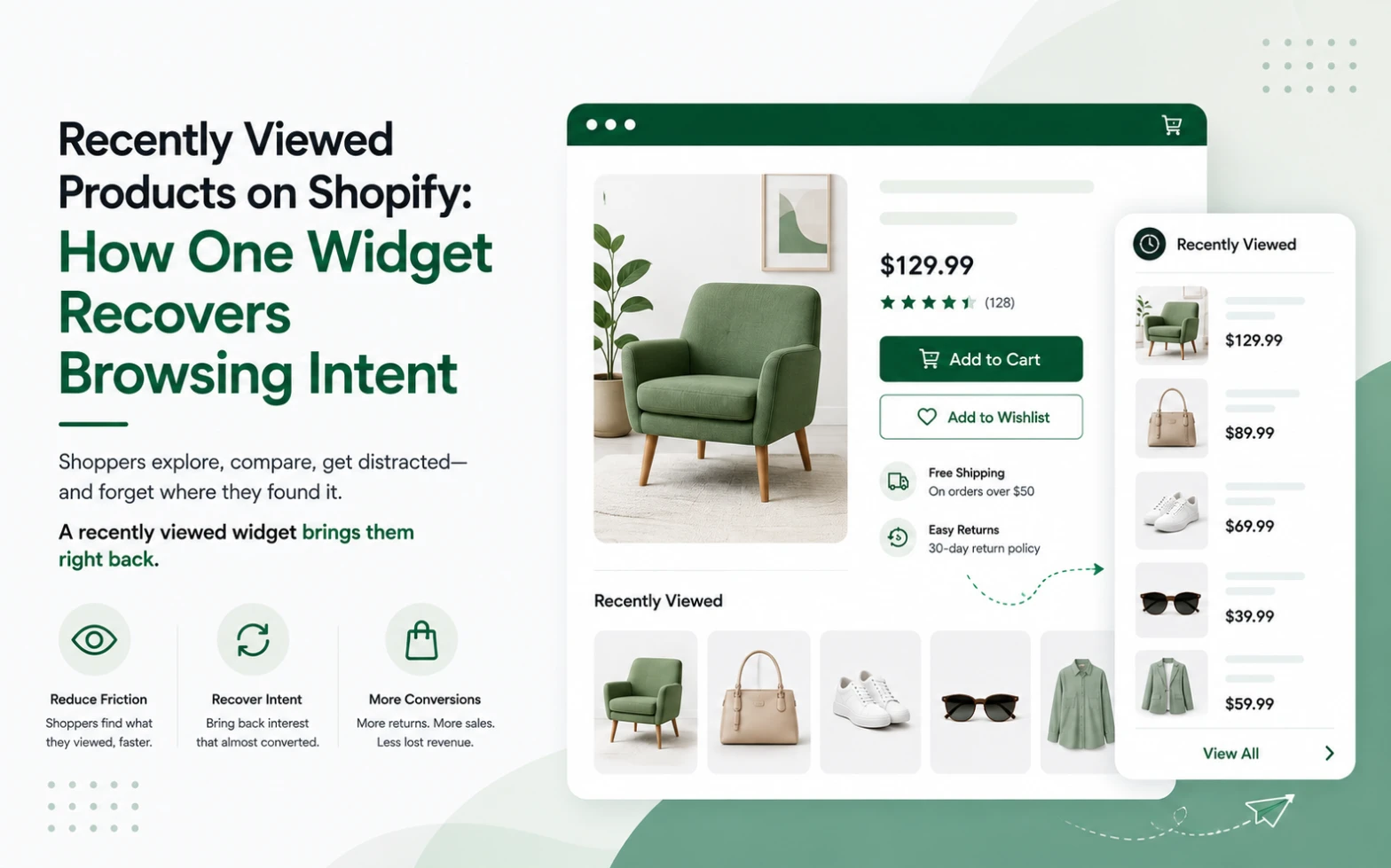
Recently viewed products on Shopify are a storefront feature. They automatically track the product pages a visitor opens during a session, then display those items back to them. You’ll usually see them in a small carousel on the product page, homepage, or collection page.
This is a different job than a recommendation engine. A recommendation widget predicts what a shopper might like based on catalog patterns or other customers’ behavior. A recently viewed section doesn’t predict anything. It remembers.
Why Recently Viewed Products Can Reduce Product Discovery Friction
Human memory is unreliable for browsing paths. A shopper can usually recall that she liked something, rarely the exact sequence of clicks that got her there. Every extra step required to relocate a product is a small tax on her patience. That patience runs thin on mobile screens and short attention spans.
A recently viewed section removes that tax. It shortens the route back to a product from several clicks and a fresh search to a single glance and one tap. That doesn’t manufacture desire that wasn’t already there. What it does is preserve the shopping context that would otherwise disappear the moment a tab closes. That matters most on stores running paid traffic, where every visit already cost something to earn.
It’s worth being precise here: a recently viewed widget can shorten the path back to a product and reduce browsing friction. It isn’t a guarantee of a sale. What it reliably does is remove one specific, avoidable piece of friction from an otherwise normal shopping journey.
That friction is more common than most merchants assume. Research from the Baymard Institute, which has spent over a decade studying ecommerce checkout behavior, found something striking. 42% of US online shoppers have abandoned a cart because they were “just browsing” and not yet ready to buy. That isn’t lost interest. It’s ordinary browsing behavior, and it’s exactly the group a recently viewed section brings back with less effort.
Recently Viewed vs Recommended Products: What Is the Difference?
The simplest way to separate the two: recently viewed products say “here is what you already explored.” Recommended products say “here is what you might want next.”
One is memory. The other is a guess, however well-informed.
Neither replaces the other. A recently viewed section keeps a shopper connected to items she’s already shown real interest in. A recommendations section introduces options she hasn’t seen yet. Used side by side, they cover both halves of product discovery: rediscovery and exploration. Most Shopify stores lean heavily on the second and quietly skip the first. Yet the first requires no prediction at all.
Where Should Shopify Merchants Place Recently Viewed Products?
Placement changes what the section actually does for the visitor.
On product pages, it supports comparison. Someone looking at one dress can glance sideways at two others she checked earlier. She won’t lose her place on the current page.
On the homepage, it supports return visits. A shopper who comes back a day or two later sees her own browsing history immediately. She doesn’t have to search for anything first.
On collection pages, it supports continued browsing. Someone scanning a large catalog gets a quiet reminder of what already caught her eye, sitting right alongside new options.
None of these placements compete with one another. Each supports a different moment in the same journey, which is why the strongest setups usually use more than one.
How Qe Recently Viewed Fits Into the Shopify Shopping Journey
This is where Qe Recently Viewed by QeApps becomes worth a closer look. It handles this one job well, without a theme rebuild or a developer.
The app displays a responsive, mobile-friendly carousel of the products a shopper has already viewed. It appears on the homepage, product pages, and collection pages. From there, shoppers can open a quick sliding drawer to check variants and add an item straight to cart. They never have to leave the page they’re on. Merchants can also layer in promotional or discount badges inside that drawer. They can optionally add a “Best Seller” section alongside the recently viewed carousel.
Setup runs through the Shopify Theme Editor. Activate the app block under App Embeds and drag the section wherever it fits. It starts tracking and displaying automatically, no code required. The carousel adapts to your theme’s fonts and colors. Merchants can further adjust slider style, image size, product display range, and the quick-add button from the app settings.
Qe Recently Viewed has also earned Shopify’s Built for Shopify badge. Shopify gives that recognition only to apps that meet its standards for performance, reliability, and user experience. That matters here specifically. A recently viewed widget that slows down the page it’s trying to help would defeat its own purpose.
For merchants whose traffic skews heavily mobile, it’s also worth thinking about mobile shopping continuity more broadly. Recently viewed products solve the “I can’t find it again” problem within a session. A Shopify PWA solves a related but separate problem. It gives returning mobile shoppers a faster, app-like way back into the store. They go straight from their home screen, instead of a search engine.
A Simple Example: From Lost Product Interest to One-Click Return
Picture a home goods shopper browsing a Shopify store on her lunch break. She opens a ceramic vase, then a linen throw, then a small side table, comparing them loosely in her head. Then she closes the tab without adding anything to cart.
That evening, she opens the store again on her phone. Without a recently viewed section, she’d need to remember which collection or search term led her to those three items. With one installed, all three are sitting right on the homepage or the first product page she opens. No searching, no retracing steps. Just a direct route back to what already caught her attention.
Why This Small Shopify UX Element Matters
Not every conversion problem needs another discount code, another popup, or another campaign. Sometimes the more useful move is simply helping shoppers continue a journey they already started on their own.
Recently viewed products don’t try to convince anyone of anything. They remove a small, specific piece of friction: the effort required to relocate something a shopper already liked. That’s a modest promise, and it’s a realistic one. That’s exactly why it tends to hold up better over time than flashier tactics do.
If shoppers are already browsing products on your store, give them an easier way to find those products again.
The Practical Takeaway
Shopify merchants already spend heavily to earn every product page visit. What happens after a shopper leaves that page without buying deserves just as much attention. So does what brought her there in the first place. A recently viewed section is a small, low-effort way to keep that visit from going to waste. It works even after the tab closes.
If this sounds like a gap on your own store, it’s worth a look. Explore Qe Recently Viewed to see how it fits your theme. Or install it from the Shopify App Store and watch your own recently viewed carousel go live in minutes.
Frequently Asked Questions
Q.1 What are recently viewed products on Shopify?
A storefront feature that automatically tracks which product pages a shopper opens, then displays those items back to them. You’ll usually see them in a carousel on the homepage, product page, or collection page, so shoppers can return without searching again.
Q.2 How do recently viewed products work on Shopify?
The app tracks product views as a shopper browses, then automatically populates a widget with those items. The app needs no manual entry; the display updates automatically as the shopper views new products during the session.
Q.3 Do I need coding to add recently viewed products to Shopify?
No. Apps like Qe Recently Viewed install through the Shopify Theme Editor. Activate the app block under App Embeds, place the section where you want it, and it begins tracking automatically.
Q.4 Where should I place recently viewed products on my Shopify store?
Product pages support comparison, the homepage supports returning visitors, and collection pages support continued browsing. Most stores benefit from using more than one placement.
Q.5 Does Qe Recently Viewed work on mobile?
Yes. It uses a fully responsive layout that adjusts cleanly across phones, tablets, and desktop.
Related Blogs



 [email protected]
 +91 95747 42204
 9th Floor, Solitaire Connect, Near Gallops Motors, SG Highway, Ahmedabad, Gujarat 380015


