
- Apps
 BYOB ‑ Bundle Gift Box Builder
Build your Own Box
 Easy Bundle ‑ Product Builder
All-In-One bundle builders
 Checkout Blocks & Customizer
Checkout Customization
 Qe Slider ‑ Carousel Slider
Elevates Revenue with Slick Slider


 Qe Seasonal Effects & Decor
Add Festive Seasonal Decorations
 Qe Quick Link Redirect
Fix Broken Links Effortlessly
 Qe Frequently Bought Together
Boost Sales with Smart Upsells
 QeApps ‑ Mobile App Builder
No-code Mobile App Builder
 Qe Product Compare
Allowing Shoppers to Compare Items
 Qe Multiship
Ship Items to Multiple Addresses
 Discount Bulk Volume Quantity
Create Custom Product Bundles
 Sticky Cart+ Fly Cart
Add Fly-to-Cart Animations.
 QeCart ‑ Slide Out Cart
Add Dynamic Slide-out cart
 Qe Speechify | Voice Search
Seamless Voice Search Functionality
 Qe FAQ Page & Product FAQs
Customizable Product FAQs
 ATC Button Animation
Add to Cart Button Animations

Explore Our Shopify Apps to Grow Your Store
- Check Our Apps


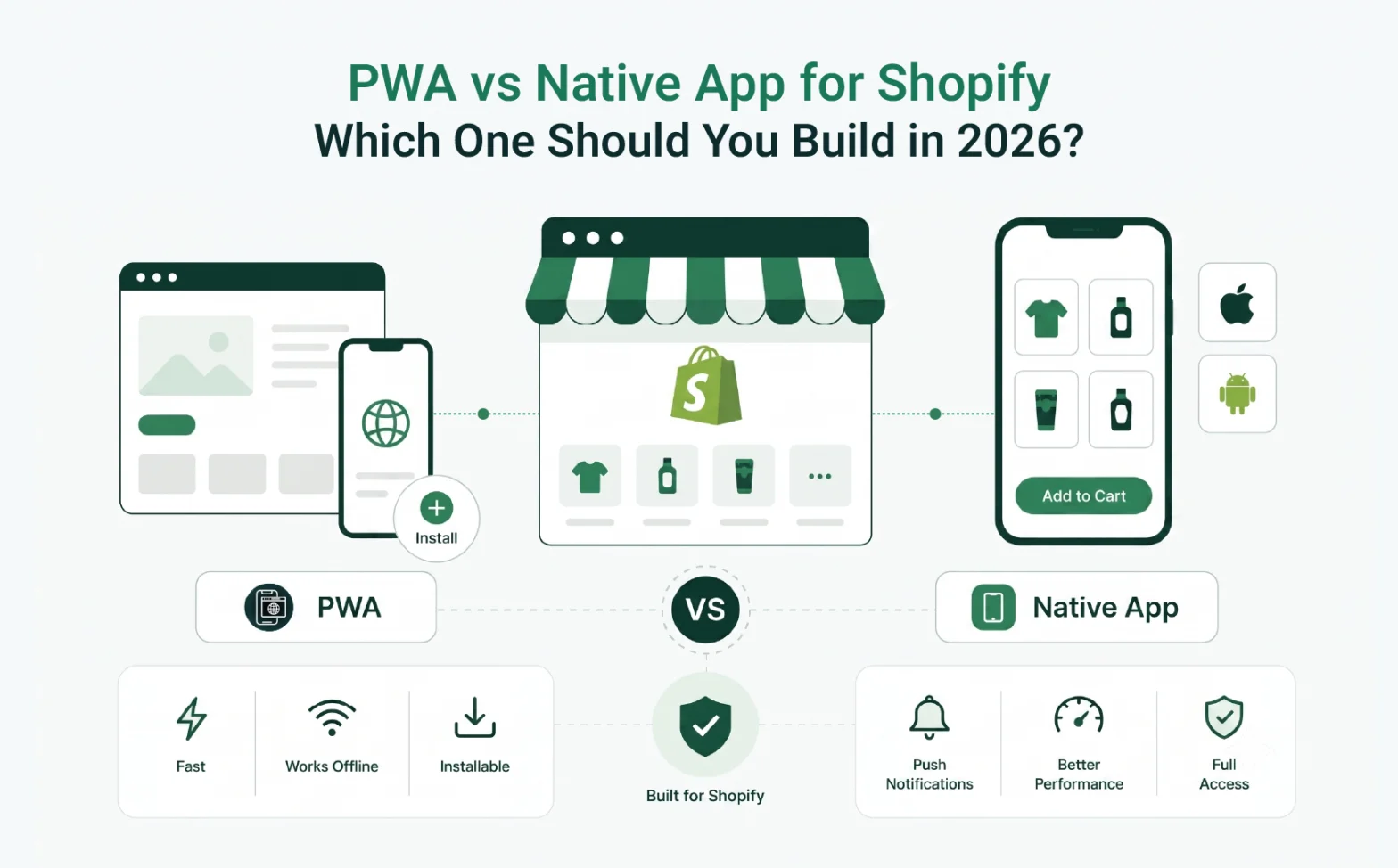
Every Shopify merchant eventually hits the same wall. Mobile traffic is climbing, yet mobile conversions aren’t keeping up. Then someone on your team says, “We should build an app.” Suddenly, you’re staring at a six-figure development quote, a nine-month timeline, and a decision that feels much heavier than it should.
Here is the truth most agencies won’t tell you upfront: most Shopify stores don’t need a native app. Instead, what they need is a progressive web app, and understanding that difference could save you $200,000 or more.
This article breaks down what native apps and PWAs actually deliver for Shopify merchants, what each one really costs, and why Qe PWA for Shopify – a Built for Shopify certified app – has become the smarter starting point for merchants who want a real mobile presence without the developer project.

What the Mobile Commerce Numbers Are Actually Telling You
Mobile isn’t just a growing channel. It’s already the primary one. According to data published by The Retail Exec in 2026, mobile devices now drive 78% of ecommerce traffic and generate 66% of all online orders.
That’s a number worth sitting with. Three out of four shoppers visiting your store right now are on their phone. So if your mobile experience is slow, awkward, or forgettable, most of them leave before they ever reach checkout.
The natural instinct is to build a native app. After all, it feels like the high-quality move. Large brands have native apps, and your customers use native apps, so it must be what you need.
Except most Shopify merchants who go down that road return with the same story: months lost, budgets stretched, and an app sitting in the store with 60 downloads.
Quick Insight
Mobile drives the majority of ecommerce traffic, but mobile conversion rates still average 50–70% lower than desktop. The gap isn’t a device problem; it’s a mobile experience problem. Slow load times, no way to re-engage a visitor after they leave, and a forgettable browsing experience are the three main causes.
What a Native App Is And What It Actually Costs
A native app is built specifically for a mobile operating system. iOS apps are written in Swift or Objective-C, while Android apps run on Kotlin or Java. The code executes directly on the device, which is why native apps can feel fast, fluid, and deeply integrated with the phone’s hardware.
That hardware access is where native apps genuinely shine: camera, biometric login, GPS, NFC, Bluetooth. For a navigation tool, a fitness tracker, or a gaming product, those capabilities matter a great deal.
However, a Shopify store selling apparel, supplements, home goods, or beauty products has no real use for any of that. Customers visit to browse products, add items to the cart, and check out. Camera access, GPS, and NFC play no role in that journey.
The Real Numbers Behind Native App Development
This is where the conversation changes fast.
According to GoodFirms, a leading B2B software research platform, ecommerce app development costs typically range from $40,000 to $250,000+ when building for both iOS and Android. That figure covers the initial build only.
Once the app is live, annual maintenance typically runs 15–20% of the original build cost. On a $100,000 app, that’s $15,000 to $20,000 per year before a single new feature gets added.
Then there’s the approval process. Apple’s App Store review takes anywhere from 2 to 7 days per submission, and if an update gets rejected, you return to the back of the queue. As a result, every price change, banner swap, or product category addition is potentially waiting on a review cycle you don’t control.
Beyond that, you’re looking at separate codebases for iOS and Android, separate development teams to maintain them, Apple Developer Program fees, Google Play console registration, and the marketing cost to actually get customers to download the app in the first place.
For large-scale DTC brands doing millions in monthly mobile revenue, a native app can pay off. For the majority of Shopify merchants, though, the economics rarely stack up.
Quick Insight
The build cost is only the first bill. Getting customers to actually download a native app requires a separate marketing budget, app store ads, social campaigns, and influencer pushes just to hit a few hundred installs. That’s a cost most development quotes never mention upfront.
What a PWA Is – What Shopify Merchants Actually Need to Know
A Progressive Web App is a website that behaves like an app. It lives on the web but delivers experiences customers associate with native apps: fast page loads, offline browsing, home screen installation, and push notifications.
Customers don’t download a PWA from the App Store. Instead, they visit your store, receive a prompt to “add to home screen”, and tap once. Your store now lives on their phone, branded with your icon, opening full-screen, with no browser bar in sight.
According to Straits Research, the global PWA market was valued at $3.53 billion in 2024 and is projected to grow to $21.44 billion by 2033, at a compound annual growth rate of 18.98%. Brands across ecommerce, media, and finance are adopting PWAs because the business case is clear and the implementation friction is minimal.
What a PWA Can Do for Your Shopify Store
- Load pages faster through local asset caching
- Send push notifications to iOS and Android users
- Allow browsing with limited or no internet connection
- Let shoppers install your store to their home screen in under 10 seconds
- Keep your brand visible on their device between purchase cycles
Quick Insight
PWAs on iPhone have supported push notifications since iOS 16.4, but only when the store is actually installed to the home screen. That makes the install prompt far more important than most merchants realize. It’s not just a branding touch, it’s the gateway to one of the most direct customer communication channels your store has.
Where PWAs Have Limits
Being fair here matters. PWAs don’t appear in the App Store or Google Play, so if app store discoverability is a meaningful part of your customer acquisition strategy, a native app adds something a PWA cannot replicate.
Deep hardware integration also remains a native advantage in specific scenarios, particularly for AR-heavy experiences. But for the vast majority of Shopify use cases, that gap is not relevant.
PWA vs Native App: A Direct Comparison for Shopify Merchants
| Factor | Native App | PWA (e.g. Qe PWA) |
| Upfront cost | $40,000–$250,000+ | $5–$15/month |
| Time to launch | 3–9 months | Under 10 minutes |
| App store approval required | Yes (iOS + Android) | No |
| Push notifications | Yes | Yes (iOS + Android) |
| Home screen install | Yes | Yes |
| Appears in App Store search | Yes | No |
| SEO and search indexability | No | Yes |

Why Most Shopify Merchants Don’t Actually Need a Native App
Consider what mobile customers actually do in your store. They browse products and add items to the cart. Some come back after abandoning, while others check order status. Still others respond to a sale notification and buy.
None of those behaviors require deep hardware access. Instead, they require speed, a clean interface, reliability on slower connections, and a way for you to reach the customer again between visits.
A PWA covers all of those needs.
The appeal of a native app is often rooted more in perception than practical function. The assumption is that having a “real app” means customers engage more. In reality, though, customers don’t care about your technology stack. They care about whether your store loads quickly, looks good on their screen, and finds them again when you have something worth their attention.
That last part, re-engaging customers, is where push notifications do serious work. And PWAs support push notifications on both iOS and Android.
How Qe PWA Solves This for Shopify Merchants in Minutes
Qe PWA for iOS and Android was built specifically for Shopify merchants who want a genuine mobile presence without a development project.
The setup takes under two minutes. Simply upload your store icon, pick your splash screen color, and go live, with no code, no theme edits, and no developer required.
Here’s what merchants get:
Push notifications on iOS and Android.
Re-engage shoppers directly on their home screen. Flash sales, restocked products, and new arrivals. Notifications reach the phone, not the spam folder.
Home screen install.
Customers add your store to their home screen directly from their browser with one tap. Your icon. Your branding. Their phone. They’re now one tap away from their next order.
Offline mode.
If a shopper loses their connection mid-browse, they can still navigate recently viewed products. It’s a small detail that builds real trust.
Custom branding.
Your icon, your splash color, your store name. The install experience looks like your brand, not a generic web layer.
Performance optimization.
PWAs cache key assets so repeat visitors get faster load times. As a result, faster pages reduce bounce rates and increase conversion probability.
Qe PWA holds the ‘Built for Shopify’ badge, which means it meets Shopify’s highest standards for quality, performance, and merchant experience. It works with all Online Store 2.0 themes and custom storefronts, with no conflicts and no scripts left behind if you uninstall.
You can explore a real working implementation at the Qe PWA demo store before installing anything.
Quick Insight
Don’t switch on every notification type at once. Start with one high-relevance alert; back-in-stock or new arrival notifications work well, and watch how customers respond over two weeks. One well-timed, relevant notification builds trust. A flood of generic ones trains customers to turn them off permanently.
When a Native App Still Makes Sense
There are scenarios where a native app is the right investment.
For example, if your brand operates a subscription model with deep personalization, or if AR product try-on is central to the customer journey, or if you’re running a loyalty program with gamification that requires hardware integration, native offers capabilities a PWA doesn’t yet match.
Brands doing $5M or more annually in mobile revenue, with a large established repeat-purchase base, sometimes find a native app worth the build. The QeApps team also offers a dedicated mobile app builder for merchants looking to explore native app options when the time is right.
But for most Shopify merchants, especially those in growth mode or testing mobile strategies for the first time, a PWA is the more logical path. You get the majority of the value at a fraction of the cost, with results you can see in the same week rather than nine months down the road.
Final Thoughts
The question is never really “PWA or native app?” The real question is what outcome you’re trying to achieve and what investment level makes sense for where your store is today.
If you want consistent mobile presence, a way to bring customers back without relying solely on email or paid ads, and a faster mobile experience that converts, you don’t need a $150,000 development project.
A PWA gets you there. And for Shopify merchants, Qe PWA – Built for Shopify certified, no-code, and live in under two minutes, is the fastest, most cost-effective way to make it happen.
Want to see what’s possible across the full range of Shopify growth tools? Explore the QeApps suite and discover how merchants use our 20+ apps to drive revenue from every part of the shopping journey.
Ready to Put Your Store on Your Customers’ Home Screens?
Install Qe PWA from the Shopify App Store and give your store a mobile presence that works today. Setup takes under two minutes, works with every Shopify theme, and requires zero code.
FAQ
Q.1 What is the difference between a PWA and a native app for Shopify?
A native app is platform-specific code distributed through the App Store or Google Play. A PWA is a website that behaves like an app and installs directly from the browser. For most Shopify merchants, a PWA delivers comparable functionality at a fraction of the cost and without any development complexity.
Q.2 Can a PWA send push notifications to iPhone users?
Yes. Since iOS 16.4, iPhones support web push notifications for installed PWAs. Qe PWA supports push notifications for both iOS and Android out of the box, with no additional setup required beyond the initial install.
Q.3 Will a PWA appear in the Apple App Store or Google Play?
No. A PWA installs directly from the browser and does not go through app store distribution. This removes submission, review, and compliance requirements. It also means your store won’t appear in app store search results.
Q.4 How long does it take to set up Qe PWA on a Shopify store?
Under two minutes. Install from the Shopify App Store, upload your icon, set your brand colors, and your store is live as an installable PWA on both iOS and Android.
Q.5 Will a PWA slow down my Shopify store?
No. Most stores see performance improvements after enabling a PWA because cached assets reduce load times for returning visitors. Faster pages typically result in lower bounce rates and better conversion rates.
Related Blogs



 [email protected]
 +91 95747 42204
 9th Floor, Solitaire Connect, Near Gallops Motors, SG Highway, Ahmedabad, Gujarat 380015


