
- Apps
 BYOB ‑ Bundle Gift Box Builder
Build your Own Box
 Easy Bundle ‑ Product Builder
All-In-One bundle builders
 Checkout Blocks & Customizer
Checkout Customization
 Qe Slider ‑ Carousel Slider
Elevates Revenue with Slick Slider


 Qe Seasonal Effects & Decor
Add Festive Seasonal Decorations
 Qe Quick Link Redirect
Fix Broken Links Effortlessly
 Qe Frequently Bought Together
Boost Sales with Smart Upsells
 QeApps ‑ Mobile App Builder
No-code Mobile App Builder
 Qe Product Compare
Allowing Shoppers to Compare Items
 Qe Multiship
Ship Items to Multiple Addresses
 Discount Bulk Volume Quantity
Create Custom Product Bundles
 Sticky Cart+ Fly Cart
Add Fly-to-Cart Animations.
 QeCart ‑ Slide Out Cart
Add Dynamic Slide-out cart
 Qe Speechify | Voice Search
Seamless Voice Search Functionality
 Qe FAQ Page & Product FAQs
Customizable Product FAQs
 ATC Button Animation
Add to Cart Button Animations

Explore Our Shopify Apps to Grow Your Store
- Check Our Apps


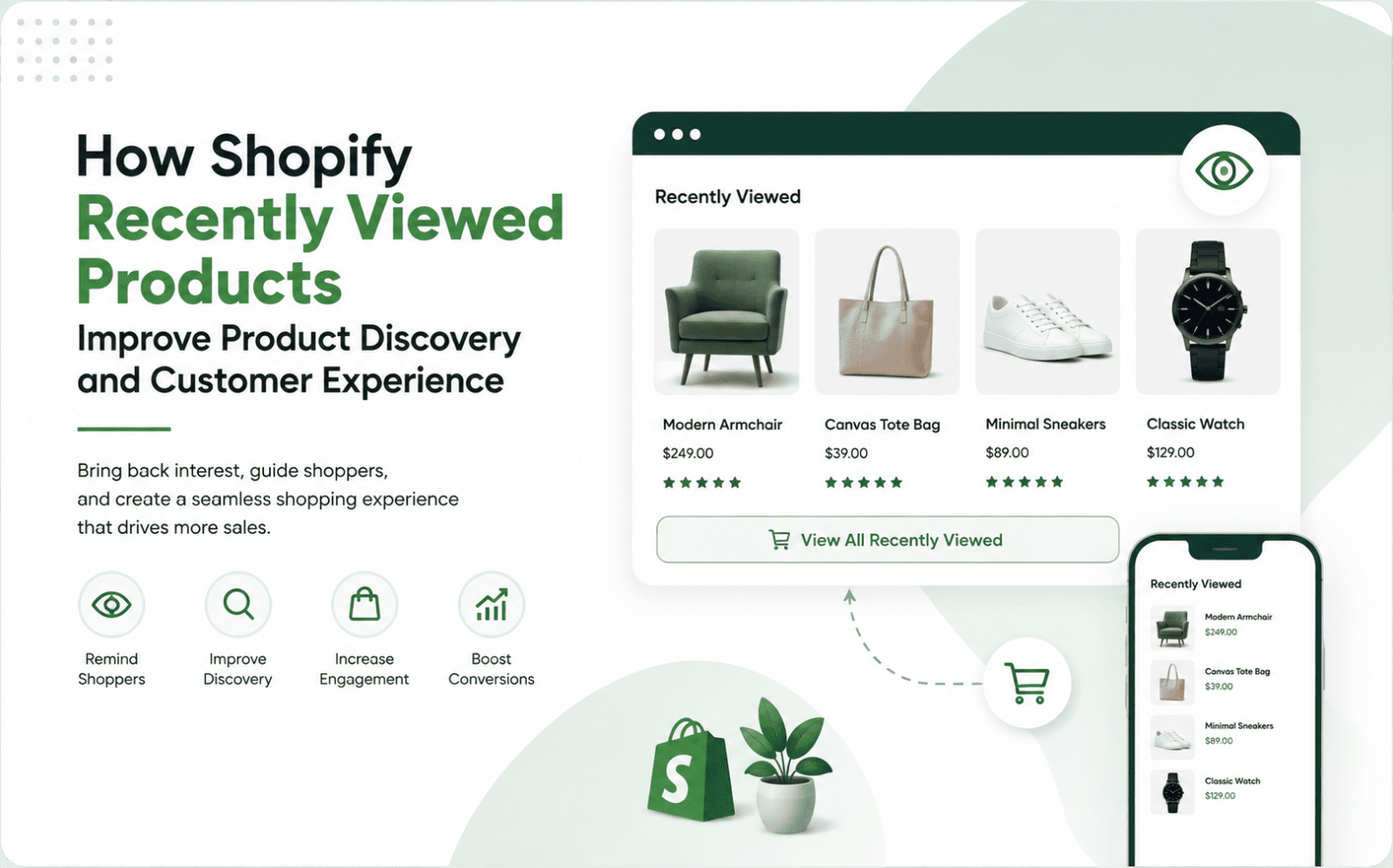
Shopify recently viewed products turn a scattered browsing session into something a shopper can find again. Here is what that looks like in practice.
A shopper furnishing a living room opens a sofa on a Shopify home store, then a rug, then a floor lamp, switching categories in one browsing session. They leave without buying, and two days later they come back, unable to remember which sofa they liked or which collection held the lamp.
This is not a story about weak products. It is a product discovery problem, common on any store with more than a handful of items.
That is exactly the gap recently viewed products close. They let a store remember what a shopper looked at across categories, so shoppers do not have to rebuild their own browsing path from memory.
What Are Recently Viewed Products on Shopify?
Recently viewed products are a storefront section. They automatically track the product pages a shopper opens, then show those exact items back later.
Recommendation widgets work differently. They guess at new products from catalogue data. A recently viewed section, however, shows nothing predicted; it shows only what the shopper actually looked at.
This distinction matters most on stores with large or varied catalogues. A shopper’s browsing history often spans several categories in a single visit, not just one product line.
Why Product Discovery Breaks Down in Shopify Stores
Product discovery is usually framed as search and navigation: can shoppers find what they want via the menu or search bar? But much of discovery happens after the first find, when a shopper tries to relocate something they already saw.
A fashion shopper compares three jackets from different collections. A skincare shopper opens four serums while reading ingredient lists. A beauty shopper checks several shades of the same product.
In each case, the problem is not a lack of interest. It is the lack of a way back to what they already found.
This gap is measurable. Attentive’s 2026 personalisation research, cited by Shopify, found that 70% of online shoppers feel overwhelmed, uncertain, or say it takes too long to find an option they like. As a result, 21% give up entirely.
That overwhelm is not always about too few options. Often, it is too many previously seen ones with no easy way back.
Quick Insight
Shoppers rarely lose interest. They lose track of what they already found, and that is a navigation gap, not a product gap.
How Recently Viewed Products Improve Product Discovery
A recently viewed section acts as a discovery layer, not just a reminder widget. It works through a few distinct mechanisms:
- It preserves browsing context. A shopper’s path through the catalogue stays visible, instead of resetting each time they leave a page.
- It shortens the path back to a product. Instead of searching or reopening a collection, shoppers tap the item directly from the carousel.
- It supports comparison shopping. Products a shopper considered stay side by side, which matters for shades, variants, and near-identical items.
- It makes large catalogues feel smaller. A personal shortlist beats scrolling through the full range a second time.
- It creates continuity across a session. Moving between collections does not mean losing track of earlier choices.
- It supports multi-session shopping. A returning shopper who sees their own history picks up closer to a decision than one who starts over.
Recently Viewed Products vs Product Recommendations
These two features are often bundled together, but they answer different questions.
Recently viewed products draw entirely on a shopper’s own browsing history. They answer one question with certainty: what did this shopper already look at?
Product recommendations work differently. They pull from wider catalogue patterns and other shoppers’ behaviour to answer a different question: what might this shopper want next? One rediscovers. The other explores.
Neither replaces the other, and relevance is the principle connecting them. Attentive research, also cited by Shopify, found that 73% of shoppers are more likely to purchase when the products shown are relevant to their needs.
Recommendations earn that relevance through prediction. Recently viewed products earn it through certainty: the shopper chose these items on their own.
Quick Insight
Recommendations predict what a shopper might like. Recently viewed products already know, because the shopper picked those items themselves.
How Recently Viewed Products Change the Shopping Experience
Most customer experience improvements ask a shopper to do something extra: fill in a quiz, create an account, or dismiss a pop-up. Recently viewed products ask for nothing.
The benefit shows up simply because the shopper already did the work of looking.
This matters most while a shopper weighs two or three items they liked. Without a visible history, deciding usually means reopening a search or scrolling back through a collection, trying to recall a title precisely enough to find it again.
Each step is small. Together, though, they add a kind of decision fatigue that has nothing to do with whether the shopper liked what they saw.
On mobile, that fatigue is worse. Rebuilding a browsing path by thumb costs more effort than the same action on desktop. A visible row of recently viewed items replaces that reconstruction with a single tap.
Stores using a Shopify PWA extend that same continuity to returning mobile shoppers, right from the home screen.

Matching Placement to the Shopper’s Moment, Not Just the Page
Where a store shows recently viewed products should follow what the shopper is doing. It should not default to every page template at once.
Mid-browse, while a shopper weighs two or three items, the product page is where the row earns its keep. It keeps earlier choices in view without pulling shoppers away from what they are reading.
On a return visit days later, the homepage is where continuity matters most. The shopper has not searched yet, so seeing their own history the moment they land removes the need to reconstruct it from memory.
Partway through a longer browse, a collection page can hold a quiet row of recently viewed items alongside new ones. This suits a shopper who is still exploring, rather than trying to get back to something specific.
In short, merchants get more value from placing the feature where shopper intent actually shifts, rather than switching it on everywhere by default.
Quick Insight
Placement should follow intent, not habit. A row that earns its place on the product page will not automatically earn its place on the homepage too.
What Makes a Good Shopify Recently Viewed Experience?
Not every implementation delivers the same benefit. Here is what is worth checking for:
- Mobile-responsive layout that does not slow page load
- Clean product cards with clear pricing and imagery
- Quick access to variants without leaving the current page
- Theme compatibility, so it looks native rather than bolted on
- Customisable slider title, image size, and colours
- No-code setup through the theme editor
How Qe Recently Viewed Supports Product Discovery
Qe Recently Viewed, one of QeApps’ Shopify apps, is built around this exact discovery problem. It displays a responsive carousel of previously viewed products across the homepage, product, and collection pages. As a result, the rediscovery layer above is not something a merchant has to build from scratch.
A quick sliding drawer lets shoppers check variants and add to cart without leaving the page, which helps when comparing near-identical products side by side. Discount badges also appear inside that drawer when a previously viewed item goes on sale, and merchants can add a Best Seller section for shoppers with no browsing history yet.
The app also carries Shopify’s Built for Shopify badge, given only to apps that meet Shopify’s performance and reliability standards. That matters, because a discovery feature that slows the page down works against its own purpose.
Quick Insight
A recently viewed carousel only helps if it loads fast. A slow widget solves one friction point by creating another.
How to Add Recently Viewed Products Without Coding
Setup does not require a developer. In the Shopify admin, go to Online Store, then Themes, then Customise.
Open App Embeds, activate Qe Recently Viewed, and click Save. Tracking and display then start automatically once a shopper views a product.
How to Use Recently Viewed Products Without Creating UX Clutter
Keep the carousel visually consistent with the theme, rather than styling it as a separate promotional block.
Avoid stacking it next to several other recommendation sections, since competing carousels dilute each other. Instead, prioritise mobile layout first, because that is where most Shopify traffic lands.
Finally, review which placements shoppers actually use before adding more.

Frequently Asked Questions
Q.1 What are recently viewed products on Shopify?
A storefront section that automatically tracks which products a shopper opens. It then shows those items back to them, usually in a carousel on the homepage, product page, or collection page.
Q.2 How do recently viewed products improve product discovery?
They shorten the path back to a product the shopper already found. They also preserve browsing context across categories, which matters most on stores with large or varied catalogues.
Q.3 Can recently viewed products improve the Shopify customer experience?
Yes, indirectly. Less repeated searching and easier comparison meaningfully smooth the shopping experience, particularly on mobile.
Q.4 Can I add recently viewed products to Shopify without coding?
Yes. Apps like Qe Recently Viewed install through the Shopify Theme Editor. Activate the app block under App Embeds, and it starts tracking automatically.
Q.5 Is Qe Recently Viewed mobile-friendly?
Yes. It has a fully responsive layout that adapts cleanly across phones, tablets, and desktop screens.
Related Blogs



 [email protected]
 +91 95747 42204
 9th Floor, Solitaire Connect, Near Gallops Motors, SG Highway, Ahmedabad, Gujarat 380015


