
- Apps

 Easy Bundle ‑ Product Builder
All-In-One bundle builders

 Qe Slider ‑ Carousel Slider
Elevates Revenue with Slick Slider


 Qe Seasonal Effects & Decor
Add Festive Seasonal Decorations
 Qe Quick Link Redirect
Fix Broken Links Effortlessly
 Qe Frequently Bought Together
Boost Sales with Smart Upsells
 QeApps ‑ Mobile App Builder
No-code Mobile App Builder
 Qe Product Compare
Allowing Shoppers to Compare Items
 Qe Multiship
Ship Items to Multiple Addresses
 Discount Bulk Volume Quantity
Create Custom Product Bundles
 Sticky Cart+ Fly Cart
Add Fly-to-Cart Animations.
 QeCart ‑ Slide Out Cart
Add Dynamic Slide-out cart
 Qe Speechify | Voice Search
Seamless Voice Search Functionality
 Qe FAQ Page & Product FAQs
Customizable Product FAQs
 ATC Button Animation
Add to Cart Button Animations

Explore Our Shopify Apps to Grow Your Store
- Check Our Apps

It is late November. An office manager emails your store to order 40 client gift boxes. Each one needs a different company name on the card. Your product page has no field for that. So the request arrives as a spreadsheet attached to an email. Someone on your team then spends the next hour matching names to order numbers by hand.
Or maybe a bride messages your Instagram about bridesmaid proposal boxes. Each box needs a different name. The details end up scattered across three DM threads before the order is even placed.
This is what happens when Shopify product personalisation is missing from the product page itself. The request does not disappear. It just moves somewhere harder to track: an email, a DM, a WhatsApp chat, a sticky note on someone’s desk.
This guide covers what personalisation looks like on a modern Shopify store. It explains why it is worth building into your product pages properly and how to set it up without a developer.
Why Product Personalisation Matters in Modern E-commerce
The numbers back up what most gifting and custom product merchants already sense. Deloitte found that 80% of consumers say they prefer brands that offer personalised experiences, and those same shoppers report spending 50% more with the brands that deliver it well. Separately, McKinsey’s research shows that companies growing faster than their competitors generate 40% more of their revenue from personalisation than slower-growing peers.
Put together, that sends a fairly direct message. Personalisation is not a nice extra sitting on top of your product. For gifting, apparel, jewellery, and beauty brands especially, it is becoming one of the reasons a customer picks you. Your bigger, cheaper competitor often cannot offer the same thing.
There is also a practical reason this matters right now. More gifting demand moves through Instagram, WhatsApp, and DMs every year. Businesses that capture personalisation requests cleanly on their own website, rather than across five different chat apps, are the ones set up to scale that demand. Everyone else ends up drowning in it.
What Types of Product Personalisation Can Shopify Stores Offer?
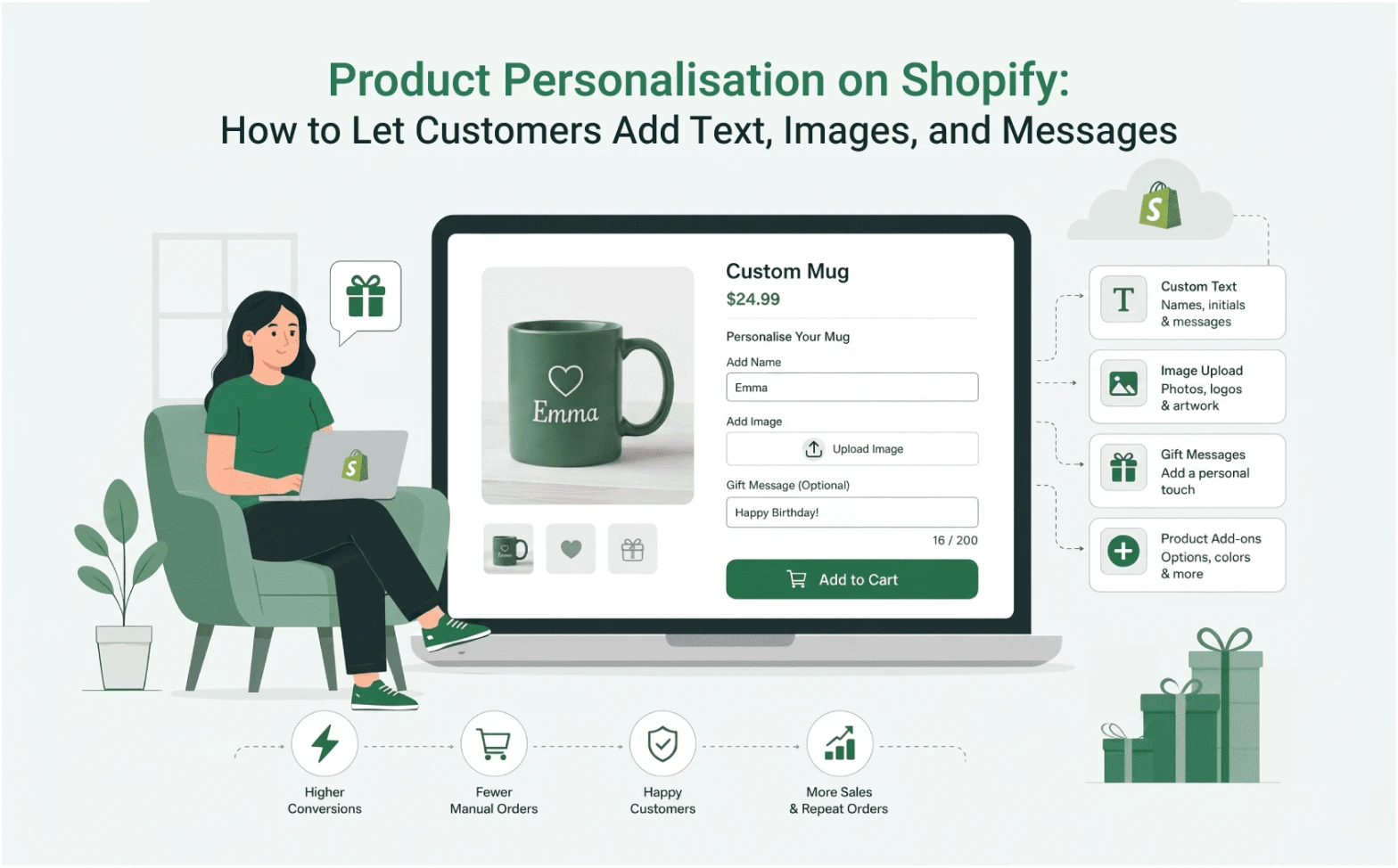
Personalisation covers more ground than a single name field. Depending on what you sell, it can include:
- Custom text and names, such as initials on a tote bag or a name printed on a water bottle
- Gift messages, written on a card as part of the checkout flow, for the recipient to read
- Image, logo, or photo upload, used for custom mugs, canvases, or branded merchandise
- Audio or video messages, an option some gifting builders now support for a more personal touch than text alone
- Monograms and engraving requests, common in jewellery and homeware
- Product add-ons, such as a ribbon colour, scent choice, or card style
- Bundle personalisation, where the customer picks what goes into a box, and the price adjusts based on what they choose
A skincare brand might only need a name field and a scent dropdown. A gifting brand handling corporate orders, wedding parties, or festive hampers needs more. It needs several of these working together at once: product selection, a message field per recipient, and card styling, all inside one flow.
Challenges Merchants Face Without a Personalisation App
Without a proper field on the product page, merchants usually handle personalisation through order notes, email attachments, or direct messages. That works fine for one order. It falls apart at 15 or 40.
Names end up on the wrong box. A message meant for one recipient lands on a different card. Someone on your team has to manually cross-reference a spreadsheet against Shopify order numbers. This usually happens during your busiest week of the year, exactly when you have the least time for it.
There is also a customer-facing cost. Shoppers want to see a confirmation of what they entered, whether it is a name, a message, or a photo, before they pay. Without that, they end up guessing whether their request actually went through. For a gift, that uncertainty is enough to make someone abandon the purchase. They will go find a competitor whose product page shows them clearly what they are ordering.
Beyond the sale itself, this creates ongoing costs that are easy to underestimate. A wrong detail means a reprint or a refund. Support conversations eat into time you do not have during peak season. Custom orders that cannot sit as clean, trackable SKUs make your inventory messy.
How Shopify Stores Can Offer Product Personalisation Without Coding
The fix does not require a development team. A product options or bundle builder app can meet most personalisation needs. It adds structured fields directly to your product page: a text box for a name, a file upload for a photo, a dropdown for add-ons.
Setup generally follows the same pattern across apps. You install it from the Shopify App Store. You choose which products need personalisation, pick your field types, and set rules, such as a character limit on gift messages or a required field for engraving. These apps sit on top of your existing theme. There is no code to touch and no product template to rebuild from scratch.
The main thing to get right is matching the app to how complex your personalisation actually is. A single name field is a light lift. A full “build your own box” experience needs more. When a customer picks products, sets quantities, and writes a message on a card, you need an app built specifically for that kind of multi-step flow.
How QeApps Gift Box Builder Simplifies Product Personalisation
This is where a tool like Qe BYOB fits in. QeApps built it for merchants dealing with exactly the corporate, wedding, and seasonal gifting scenarios above. These are brands assembling gift sets or curated boxes, where the customer chooses products and personalises the result at the same time.
The core flow keeps things simple. A customer selects a gift box, adds products, chooses a gift card, and writes a personal message on it. They preview the whole selection, then purchase. The message stays attached to the order, instead of arriving separately in an email or a note field. For merchants who want to go beyond a written note, BYOB also has a configuration built around audio and video messages. Customers can attach a short recording instead of, or alongside, text. That is a genuine point of difference from most personalisation apps, which stop at a text box.
BYOB also runs a separate builder style purely for product-based bundles. Here, the customer picks whichever items they want, and the price adjusts automatically based on what is in the box. This style suits stores that care more about flexible bundling than written messages. It can also sit alongside the gift-message flow, depending on which layout you choose.
For merchants handling seasonal or corporate gifting specifically, this also solves a pricing problem. BYOB supports fixed pricing for pre-set boxes, and percentage or flat-rate discounts. It also supports dynamic pricing for fully custom selections. So a batch of 40 personalised client gifts does not mean manually adjusting prices order by order.
Best Practices for High-Converting Personalised Product Pages
A personalisation field only helps if customers actually use it correctly. A few habits make a real difference:
- Keep the personalisation field visible above the fold, not tucked in a tab
- Add a character limit on text fields and show it on screen, so customers know what will actually fit
- Show a live preview or confirmation of what was entered before checkout
- Mark each field as required or optional clearly, so nobody submits it blank by accident
- Keep the number of choices reasonable. Three or four options convert better than ten
Mistakes to Avoid
A few patterns cause more support tickets than they solve. Avoid stacking too many optional fields onto one product, since customers tend to abandon forms that feel long. Do not rely on a generic “special instructions” box for anything that needs to be accurate, like a name for engraving. Free text invites typos and confusion. Also make sure your fulfilment process actually reflects every personalisation option you offer. That gap, between what the product page promises and what your packing team can see, usually causes the wrong name to end up on the wrong item.
Final Thoughts
You do not need a large development budget to offer product personalisation properly. The right Shopify app lets customers add text, images, or even a short audio or video message directly on the product page. That works whether you are fulfilling a single corporate order or forty of them during your busiest week. It also cuts down on the manual back-and-forth that currently eats into your time.
If you are building gift boxes, custom bundles, or curated sets, take a Gift Box Builder to see how personalisation and bundling can work together in your store, or install Qe BYOB from the Shopify App Store and try it for yourself.
Frequently Asked Questions
Q.1 Do I need coding skills to add product personalisation to my Shopify store?
No. Personalisation apps like Qe BYOB add text fields, image uploads, and message boxes directly to your product page through your existing theme. No code edits or developer support are required to set it up.
Q.2 What is the difference between product personalisation and a bundle builder?
Personalisation lets a shopper customise a single item, such as adding a name. A bundle builder lets them choose several products to combine into one order. Tools like Qe BYOB combine both, so shoppers can build a gift box and personalise it in one step.
Q.3 Can customers add something other than text, like a photo or a video message?
With Qe BYOB, yes. Alongside a written gift message, there is a builder configuration for audio and video messages, and text or custom images can be captured through personalisation fields on the product page.
Q.4 Can I charge different prices for personalised gift boxes?
Yes. Most personalisation and bundle apps support fixed pricing for pre-set boxes, percentage or flat-rate discounts, and dynamic pricing based on what the customer selects.
Q.5 Will personalisation slow down my checkout process?
Not if it is set up correctly. Keeping fields visible, limited in number, and clearly labelled avoids adding friction, and a well-built app shows the shopper exactly what they have entered before they check out.
Related Blogs



 [email protected]
 +91 95747 42204
 9th Floor, Solitaire Connect, Near Gallops Motors, SG Highway, Ahmedabad, Gujarat 380015


