
- Apps

 Easy Bundle ‑ Product Builder
All-In-One bundle builders

 Qe Slider ‑ Carousel Slider
Elevates Revenue with Slick Slider


 Qe Seasonal Effects & Decor
Add Festive Seasonal Decorations
 Qe Quick Link Redirect
Fix Broken Links Effortlessly
 Qe Frequently Bought Together
Boost Sales with Smart Upsells
 QeApps ‑ Mobile App Builder
No-code Mobile App Builder
 Qe Product Compare
Allowing Shoppers to Compare Items
 Qe Multiship
Ship Items to Multiple Addresses
 Discount Bulk Volume Quantity
Create Custom Product Bundles
 Sticky Cart+ Fly Cart
Add Fly-to-Cart Animations.
 QeCart ‑ Slide Out Cart
Add Dynamic Slide-out cart
 Qe Speechify | Voice Search
Seamless Voice Search Functionality
 Qe FAQ Page & Product FAQs
Customizable Product FAQs
 ATC Button Animation
Add to Cart Button Animations

Explore Our Shopify Apps to Grow Your Store
- Check Our Apps

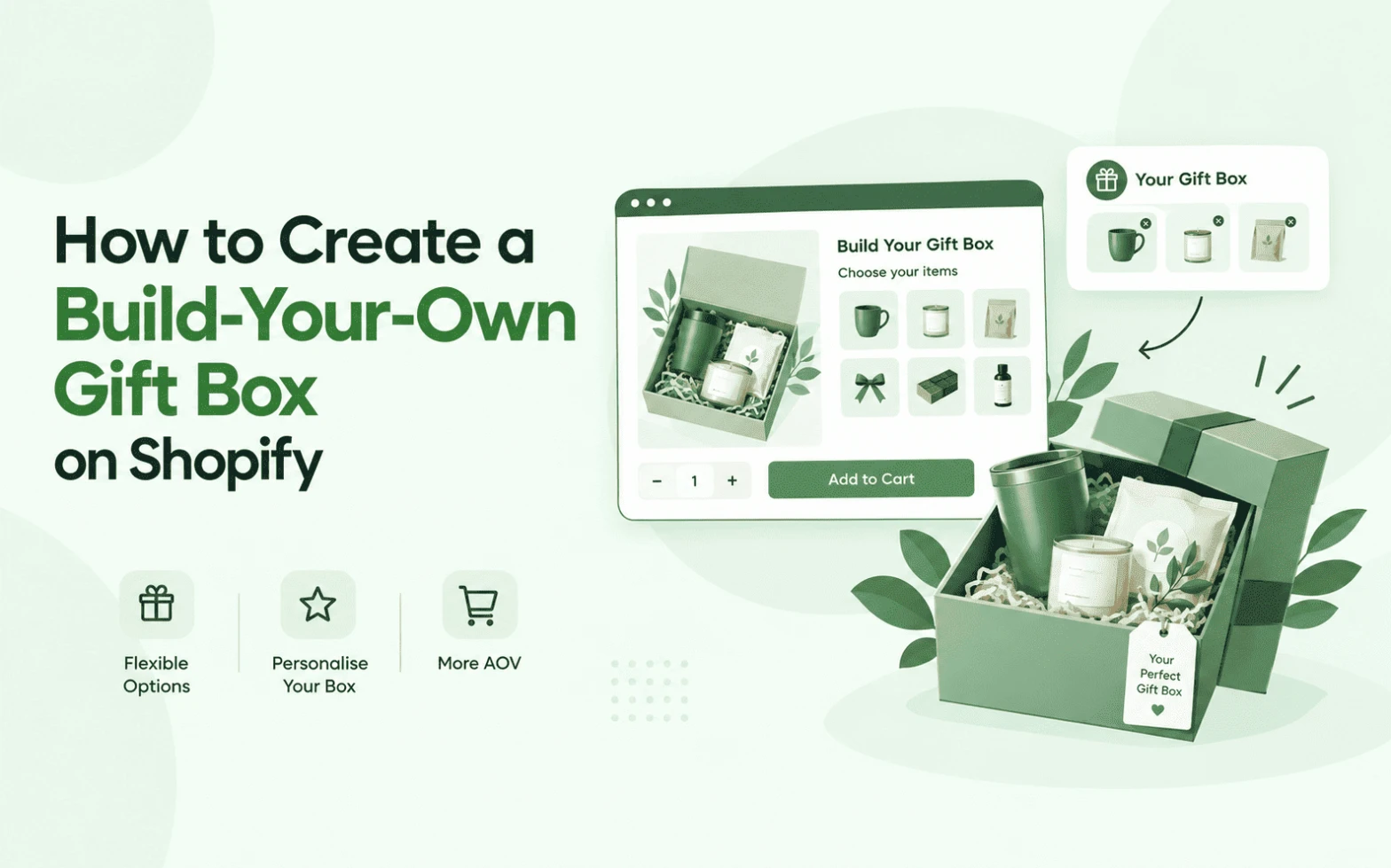
A shopper adds one candle to their basket, thinks about buying three more things for a friend’s birthday, then closes the tab instead of hunting across five separate product pages to finish the gift. That gap is exactly what a build-your-own gift box on Shopify closes: instead of accepting a fixed bundle or piecing the gift together manually, the shopper picks exactly what goes in the box, in one place. QeApps’ BYOB – Bundle Gift Box Builder, now recognised with the Built for Shopify badge, is one of the tools purpose-built for this job. This guide is a practical playbook: how to plan the box, choose products, price it, test the journey, and measure whether it’s actually working.
What Is a Build-Your-Own Gift Box on Shopify?
A build-your-own gift box lets a shopper select multiple products from a defined catalogue and assemble their own bundle, instead of buying a pre-packed set. It sits at one end of a spectrum of bundle types:
- Fixed gift box – the merchant pre-selects every item. The shopper simply buys the box.
- Mix-and-match bundle – the shopper fills a set number of slots from a merchant-defined product list.
- Build-your-own gift box – the shopper chooses products, quantities, and box style, and often adds personalisation inside one guided flow.
The three aren’t interchangeable. A fixed box is fastest to set up but gives the shopper no say. A mix-and-match bundle adds choice within firm limits. A full build-your-own experience adds the most flexibility, and usually the most personalisation, at the cost of a slightly longer setup.
Why Let Customers Build Their Own Gift Boxes?
Letting shoppers build the box themselves changes what they’re buying: from a single SKU into a considered, multi-product order. That shift shows up in a few practical ways:
- Shoppers browse more of the catalogue while filling slots, surfacing products a fixed bundle would never show them.
- The finished box feels personal rather than generic, which matters most for gifting.
- Every item added is a cross-sell the shopper chose, not one you pushed on them.
- The format works across occasions, birthdays, holidays, corporate gifting, without a new fixed SKU for each one.
None of this guarantees a lift in average order value on its own. Results depend on the products you include, how the box is priced, and how easy the builder is to use. Traffic quality matters too. According to NRF’s 2026 Father’s Day consumer survey of 7,914 shoppers, 44% of gift buyers say choosing something unique or different matters most when picking a gift, and 45% say they’re interested in gifting a subscription-style, curated box rather than a fixed one. That’s the same instinct a build-your-own gift box experience is built to serve.
Quick Insight
A build-your-own box doesn’t sell the products themselves harder. It sells the act of choosing them, which is a different job for your page to do.
How to Create a Build-Your-Own Gift Box on Shopify
Step 1: Decide What Customers Can Build
Start with the box’s structure before touching any app. Decide which occasions it’s for, how many items a shopper can add, and whether it draws from one collection or several. A wellness brand might set a box at one candle, one tea, one skincare product, and one accessory. A food brand might allow two snacks, one beverage, one chocolate item, and an optional add-on. Both work because the structure is specific enough to guide the shopper without overwhelming them.
Step 2: Choose the Products That Are Eligible
Not every SKU belongs in the builder. Favour complementary products, best sellers, items with healthy margins, and anything seasonal you want more visibility on. Putting your entire catalogue into one builder usually backfires: a shopper facing forty near-identical options is more likely to abandon the box than finish it. Six to twelve well-chosen options per slot tends to convert better than an open-ended list.
Quick Insight
Six well-chosen options beat sixty. A shopper doesn’t feel restricted by fewer choices. They feel guided by them.
Step 3: Set the Pricing Model
There’s no single correct approach. Fixed pricing suits a pre-curated box where you want a predictable margin. A flat or percentage discount rewards larger boxes without complicating the maths for the shopper. Quantity-based pricing, such as buy four and save 15%, pushes toward a specific box size. Dynamic pricing, where the total updates live as items are added, tends to suit fully open mix-and-match builds. Match the model to how much control you want over the final price, not to whichever looks most generous on paper.
Step 4: Add Personalisation Without Adding Friction
A gift message, a card choice, or an occasion selector adds meaning to the purchase, but only if it stays optional and quick. Keep required fields to a minimum: every extra mandatory step is a chance for the shopper to abandon the box before it reaches the cart. For a closer look at structuring these fields, see QeApps’ guide to Shopify product personalisation.
Step 5: Build the Customer-Facing Journey
The shopper’s path should be short and legible: choose a box, select products, review what’s inside, add any personalisation, see the price clearly, then add to cart. A visible progress indicator, such as “2 of 4 items selected”, and a running price total do more for completion than persuasive copy ever will. If a shopper can’t tell how many products they still need to add, they’ll usually leave rather than guess.

Step 6: Test the Entire Buying Journey Before Launch
Run through the builder the way a shopper would, on mobile first. Check that product selection, pricing calculations, and any discount logic behave correctly across every combination you allow. Confirm inventory updates as items are added, that the cart reflects the finished box accurately, and that personalisation fields carry through to the order confirmation and your Shopify admin. A box that works perfectly on desktop but breaks on a small screen will lose more orders than it earns.
Quick Insight
Most build-your-own gift box problems aren’t discovered by merchants. They’re discovered by the first customer who tries to check out with an empty slot.
Step 7: Track What Customers Actually Build
Once live, watch builder start rate, completion rate, and the products shoppers pick most often. A low completion rate usually points to too many product choices or a confusing box structure, not a pricing problem. A low conversion rate after completion more often points to price. Use what customers actually build, not what you assumed they’d build, to refine the eligible product list over time.
Build It Without Custom Development
None of the steps above require commissioning a custom development project. QeApps BYOB – Bundle Gift Box Builder is a no-code Shopify app built around exactly this workflow. On the merchant side: choose eligible products, configure box rules and pricing, add personalisation options, then publish. On the customer side: choose a box, select products, personalise, review the total, add to cart, and check out.
That symmetry matters because it keeps the logic in one dashboard instead of custom code that needs updating every time a pricing rule or product list changes, which is most of what seasonal gifting campaigns require. Merchants already using it have seen real shifts in behaviour: Baiabox increased average order value by 79% after launching its builder, and Hug in a Box generated over €41,000 in builder revenue in its first stretch live. BYOB also carries Shopify’s Built for Shopify badge, awarded to apps meeting Shopify’s standards for performance, design, and integration, and it currently powers more than 10,000 Shopify stores. For the full app configuration walkthrough, see QeApps’ guide to creating a custom gift box on Shopify.
Build-Your-Own Gift Box Examples by Store Type
- Beauty and skincare: a “build your set” box of three skincare steps plus one optional add-on, so shoppers can match it to their existing routine.
- Food and beverage: a hamper builder with a beverage, two snacks, and one seasonal treat, useful for corporate gifting in bulk.
- Baby and new parent: a box combining one wearable, one care item, and a personalised card, sized for a shower gift rather than a full nursery haul.
- Fashion and accessories: a “build your look” box pairing one accessory with two smaller add-ons, priced as a set rather than three separate purchases.
Make the Box Easy to Buy
A few habits separate a build-your-own box that converts from one that doesn’t:
- Keep the eligible product list focused rather than exhaustive.
- Show the running price and remaining slots at every step.
- Use consistent, high-quality product photography across every option.
- Group complementary products near each other in the selection grid.
- Keep personalisation optional unless the box genuinely needs it.
- Design the flow for a phone screen first, then confirm it holds up on desktop.
Quick Insight
The best-performing build-your-own boxes rarely have the most product options. They have the clearest structure.

Final Thoughts
A build-your-own gift box isn’t a seasonal gimmick. It’s a different way of asking a shopper to buy: not “here’s the box,” but “build yours.” If your store is ready to move past fixed gift sets, QeApps BYOB gives you the product selection, pricing, and personalisation tools to do it without a developer.
Explore QeApps BYOB – Bundle Gift Box Builder or install it directly from the Shopify App Store.
Frequently Asked Questions
Q.1 Can I create a build-your-own gift box on Shopify?
Yes. Apps such as QeApps BYOB let you configure eligible products, box rules, pricing, and personalisation without writing code, and the builder runs inside your existing theme.
Q.2 How do I let customers choose products for a gift box?
Define a set of eligible products or collections inside your builder app, set a minimum and maximum item count, and let shoppers fill those slots from the options you’ve approved.
Q.3 Can I offer discounts on custom gift boxes?
Yes. Fixed pricing, flat or percentage discounts, and quantity-based pricing are all common models, and QeApps BYOB supports each of them depending on your plan.
Q.4 Do I need coding skills to create a gift box builder?
No. QeApps BYOB is a no-code app. Product selection, pricing, and personalisation are configured through the app dashboard, and the builder matches your existing theme automatically.
Q.5 What should I track after launching a gift box builder?
Watch builder start rate, completion rate, and which products get selected most often. A low completion rate usually points to the product list or box structure; a low conversion rate after completion more often points to price.
Related Blogs



 [email protected]
 +91 95747 42204
 9th Floor, Solitaire Connect, Near Gallops Motors, SG Highway, Ahmedabad, Gujarat 380015


